Client-First Webflow: Structure, Naming & Best Practices

Client-First is a Webflow development methodology created by Finsweet to keep projects clear, consistent and maintainable. It is often described as a class naming convention, but that is only part of it. Client-First also defines a practical approach to page structure, class strategy, spacing, typography and project-wide organisation so a Webflow site can scale without becoming difficult to understand.
I use Client-First on Webflow projects because it solves a very real problem: a website should not make sense only to the person who built it. It should remain understandable to another developer, an internal team and, when relevant, the client.
This guide explains the Client-First structure, naming conventions, REM units, variables, maintenance and official certification, with a practical Webflow developer perspective.
What is Client-First in Webflow?
Client-First is an organisational system designed specifically for Webflow. Finsweet defines its goals around a shared core structure, a consistent class strategy, faster work inside Webflow Designer, scalable builds and projects that other people can understand and maintain.
That distinction matters. Client-First is not a traditional CSS framework and it is not a ready-made component library. It is primarily a set of conventions and development principles for building more organised Webflow websites.
In practice, two developers familiar with Client-First should be able to open the same project and understand its overall logic quickly, even if they have never worked together before.

How Client-First structures a Webflow project
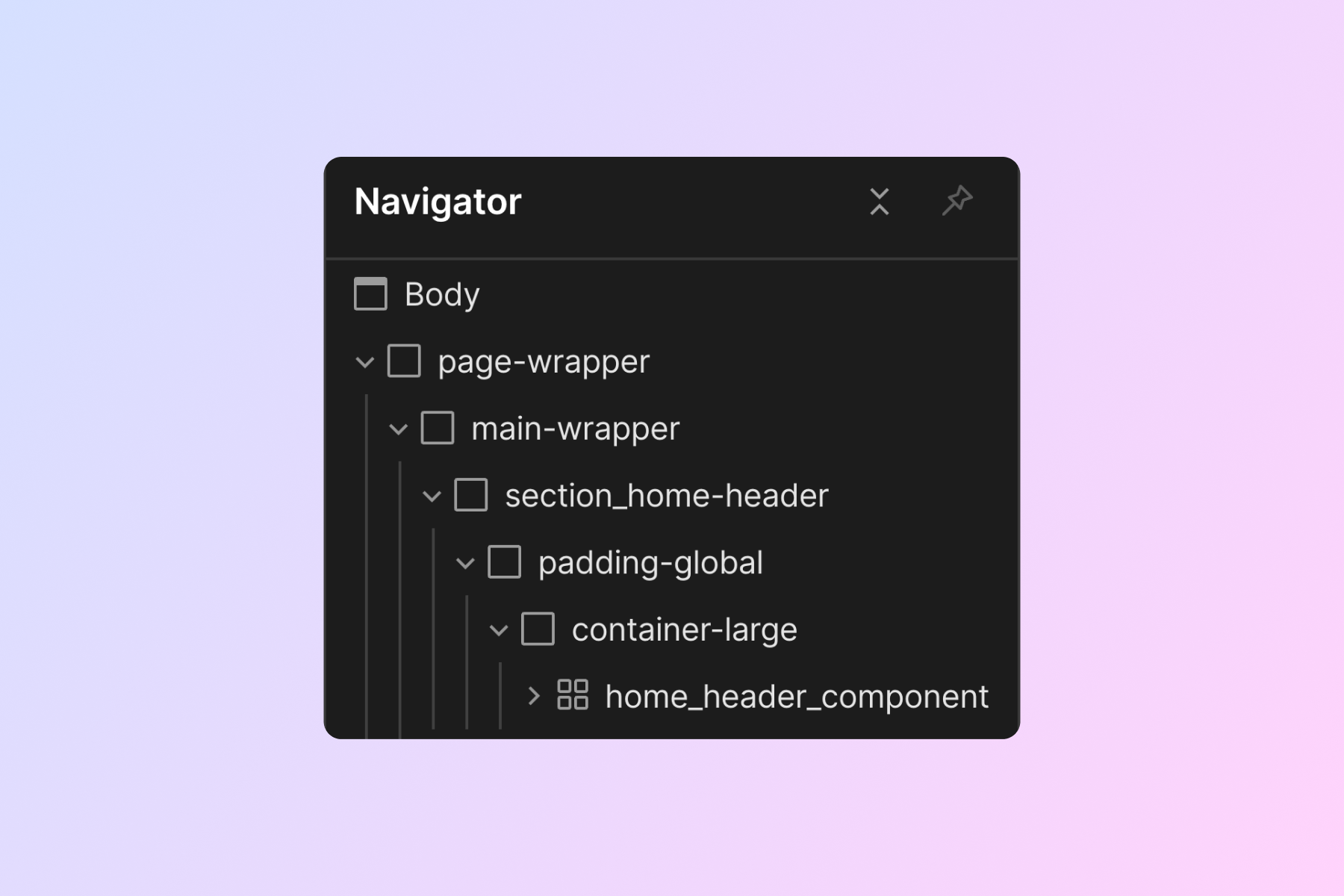
One of the most useful parts of the system is its core structure. Instead of inventing a different page architecture every time, Client-First starts from a recurring set of structural layers.
- page-wrapper wraps the whole page;
- main-wrapper contains the main page content;
- section_[identifier] identifies a specific section;
- padding-global manages global horizontal page padding;
- container-[size] controls maximum content width;
- padding-section-[size] manages vertical section spacing.
This looks simple, but it has a major impact on maintenance. When pages share the same container, padding and section logic, global changes require far fewer one-off fixes.
It also makes the Webflow Navigator easier to scan. You can quickly understand the section, container and component you are editing instead of navigating through a stack of anonymous Div Blocks.
How to build a Webflow website with Client-First
On a real project, I do not treat Client-First as an isolated checklist. I use it as a development framework from the first global styles to handoff.
- Define global styles: colours, typography, text sizes, containers and the spacing scale.
- Set up the core structure: page-wrapper, main-wrapper, padding-global, containers and section padding.
- Build components with custom classes: navigation, hero sections, cards, forms, sliders and project-specific modules.
- Use utility classes for genuinely global behaviours so component logic and utility logic stay separate.
- Structure the CMS with the same emphasis on clarity between Designer and dynamic content.
- Test responsive behaviour and accessibility before treating components as reusable.
- Prepare for handoff so another developer can understand and extend the project without reverse-engineering it.
The speed benefit comes from consistency rather than a shortcut. Structural decisions are made once, reused across the project and remain understandable when the website evolves.
Client-First naming conventions explained
Naming is probably the best-known part of Client-First. The documentation mainly distinguishes between custom classes, used for a specific component, section or element, and utility classes, used for reusable behaviours and styles.
A custom class might follow a pattern such as pricing-card_title or navbar_menu. The underscore shows the relationship between a component and one of its elements. A utility class is more likely to describe a reusable property or global behaviour, such as text-color-primary or a spacing utility.
The principle behind the name matters more than the syntax itself: someone should be able to understand what a class does without having to rediscover its visual context. Finsweet therefore recommends descriptive names and avoiding unnecessary abbreviations or shorthand.
This is especially valuable when a Webflow project changes hands or when several developers work on it over time.
Folders, components and class organisation
Client-First has also evolved with Folders, a way to group related classes visually and make larger projects easier to navigate.
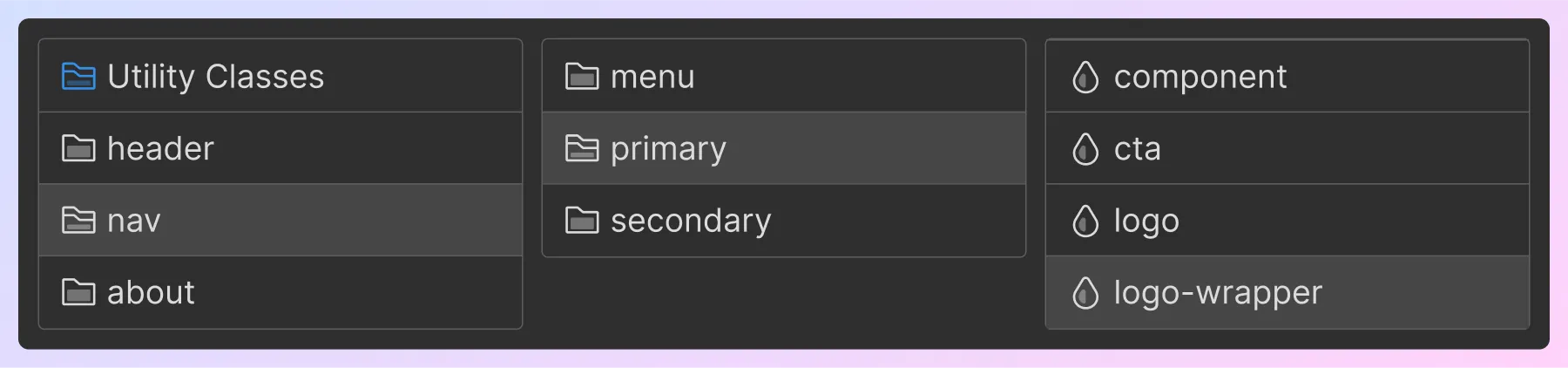
On a small website, a handful of clearly named components may be enough. On a site with many CMS templates, landing pages or reusable modules, folders can keep the Styles panel understandable as the project grows.
My rule is still simple: organisation should serve the project rather than become a goal in itself. Adding extra naming layers to a very small site can create more friction than value.
Why Client-First uses REM units
Client-First strongly favours REM units. A REM is relative to the root font size of the document. With standard browser settings, 1rem generally equals 16px.
The benefit is not just easier conversion. Relative units work better with browser text-size preferences and provide a more consistent approach to sizing and spacing. That makes them useful for accessibility and for maintaining a coherent design system.
I also prefer this approach because it reduces the number of arbitrary values across a project. A predictable spacing scale makes design decisions more consistent and responsive adjustments easier to maintain.
Webflow variables and Client-First
Webflow Variables add another useful layer to organised builds. The current Client-First documentation recommends colour variables to centralise values used across the project.
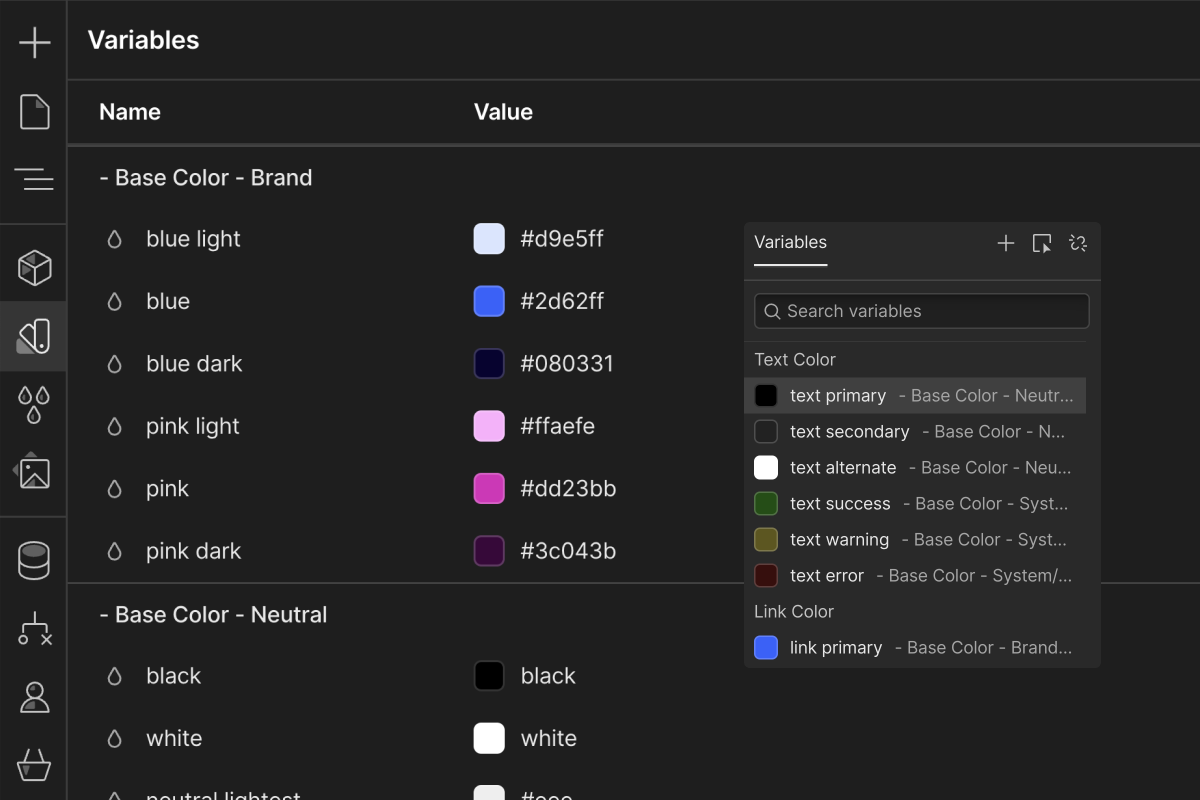
The maintenance benefit is straightforward: if a brand colour changes, updating one variable is far safer than editing dozens of independent styles.
Finsweet is more cautious about size variables. Its current documentation says it does not include them in the recommended Client-First setup while variables cannot be adjusted by breakpoint in the way the system would require. This is a useful reminder that Client-First is not a frozen rulebook: it evolves with Webflow itself.
Does Client-First actually improve maintenance?
For me, this is one of the biggest practical benefits. A consistent structure reduces the time required to locate a style, understand a section or modify a component months after launch.
It also makes handoff easier. A project built around a documented convention is much less dependent on its original developer than a site full of classes such as div-block-42, new-class-3 or hard-to-decipher combo-class chains.
This matters most on websites that continue to evolve. In my Webflow maintenance work, a well-structured foundation makes it much safer to add pages, update components and fix issues without introducing unexpected style regressions elsewhere.
Does Client-First make a Webflow site accessible?
Client-First does not automatically make a website accessible. Good class names cannot replace semantic HTML, keyboard navigation, sufficient colour contrast, meaningful alternative text or accessible forms.
However, several principles in the system support good practice: REM-based sizing, consistent structure, guidance around semantic HTML and dedicated accessibility documentation. An organised project is also easier to audit and improve because components and styles are easier to identify.
Client-First should therefore be seen as a foundation that can support accessible development, not as a guarantee of compliance.
What is the Client-First certification?
Finsweet now offers an official Client-First certification. The process includes a theory assessment and project review, with certificates and the possibility of being listed in the Client-First Experts directory after approval.
Certification can be useful for developers who want their knowledge of the system reviewed by its creators. It is not required to use Client-First correctly, however, and a badge should not replace looking at real Webflow projects, their structure and the quality of the implementation.
I see certification as an additional trust signal rather than the only criterion for choosing a Webflow developer.
Is Client-First right for every Webflow project?
I use it as a foundation for most projects, but that does not mean every rule should be applied mechanically.
On an editorial or corporate website with multiple pages, reusable components and a CMS, the value is clear: shared structure, predictable classes, easier maintenance and a cleaner handoff. On a very short landing page or temporary prototype, some layers can be simplified.
The useful question is not whether a project “uses Client-First” as a checkbox. It is whether the chosen conventions make the build easier to understand, maintain and extend.
Why I use Client-First for Webflow development
What I want from a development methodology is not just speed during the initial build. I want a project to remain clean six months or two years later, when a new page needs to be added, another developer joins the project or the design needs to evolve.
Client-First gives me a shared foundation for that. I then adapt it to the project with the right components, CMS architecture and level of documentation for the client.
In custom Webflow development, this organisation is invisible to the end user, but it makes a significant difference to technical quality, maintenance and long-term scalability.
Looking for a Webflow developer to build or take over a Client-First project? Let’s discuss your website.
FAQ
What is Client-First in Webflow?
Client-First is a Webflow development methodology created by Finsweet. It defines a shared core structure, class strategy, naming conventions, spacing principles, typography and REM-based sizing. The goal is to make Webflow projects easier to understand, maintain, scale and hand off to another developer or internal team.
What is the Client-First core structure?
The Client-First core structure includes classes such as page-wrapper, main-wrapper, section_[identifier], padding-global, container-[size] and padding-section-[size]. These layers give pages a predictable structure and make global content widths, horizontal padding and vertical section spacing easier to manage consistently across a Webflow project.
How do Client-First naming conventions work?
Client-First mainly distinguishes between custom classes, which belong to a specific component or element, and utility classes, which are designed for reusable global behaviours. Names should be descriptive and understandable without visual context. The goal is for another developer or team member to identify what a class does without reverse-engineering the whole project.
Is there an official Client-First certification?
Yes. Finsweet offers an official Client-First certification that includes a theory assessment and project review. Approved applicants can receive certificates and may be listed in the Client-First Experts directory. Certification is an additional trust signal, but it is not required to use Client-First correctly or build high-quality Webflow projects.
Is Client-First suitable for every Webflow project?
Client-First is especially useful for websites that need to remain maintainable and evolve over time, including corporate sites, editorial projects, CMS builds and larger modular websites. On a very small landing page or temporary prototype, some layers can be simplified. The important point is to use the conventions that genuinely improve clarity and maintainability.