Figma to Webflow Development: Design to Production
A strong Figma design can still become a fragile website if the implementation is treated as a visual copy exercise. Good Figma to Webflow development translates a design system into a real interface that remains responsive, maintainable and reliable when content changes.
I work from finished Figma files as well as earlier-stage designs that still need component, breakpoint or design-system decisions before development begins.
The goal is to preserve the design intent while building a site that also makes sense to the browser, the CMS, search engines and whoever has to maintain it later.

What does Figma to Webflow development actually include?
Moving from Figma to Webflow involves several translations at the same time. A frame becomes real HTML structure, Auto Layout usually becomes Flexbox or Grid, components become reusable Webflow components, and variables or styles need to remain coherent across the site.
You also have to decide which content belongs in the CMS, how interactions should behave, what happens between designed breakpoints and how the interface responds to real copy rather than placeholder text.
That decision layer is what separates a visual reconstruction from a production-ready Webflow build from Figma.
My Figma → Webflow workflow
- Review the design: frames, components, variables, typography, grids and responsive rules.
- Clean up the design system if needed: colours, spacing, reusable components and interface states.
- Plan the Webflow architecture: sections, containers, components, CMS collections and class strategy.
- Build desktop and responsive layouts around real content behaviour rather than fixed screenshots.
- Add dynamic functionality: CMS, forms, sliders, interactions and integrations where required.
- Run QA: compare against Figma, test tablet/mobile, accessibility, performance and technical SEO.
This keeps responsive behaviour and CMS architecture inside the development process instead of treating them as fixes at the end.
The official Figma to Webflow plugin: an accelerator, not the finish line
Webflow now provides an official Figma to Webflow plugin and companion app. They can sync layers, components, variables and styles and make design-system transfer significantly faster.
That matters because Figma to Webflow is no longer an entirely manual workflow by definition.
However, an import is only the start of a production build. Responsive behaviour, semantic HTML, CMS architecture, interactions, real content, accessibility, SEO and performance still need to be reviewed and often refined. Webflow also recommends syncing large pages in smaller groups of components or sections rather than transferring an entire page in one pass.
I use the official tooling when it genuinely saves time, while keeping the technical decisions that determine the quality of the final site under control.
Preparing a Figma file for Webflow
A better source file leads to a cleaner build. Before development I look for:
- consistent Auto Layout;
- reusable components and meaningful variants;
- clear colour and typography variables or styles;
- a predictable spacing system;
- responsive behaviour for tablet and mobile;
- hover, focus, open, closed and error states;
- content that should become dynamic CMS data.
If those decisions are missing, I can resolve them with the designer or directly in Figma before the build. That is usually cheaper than discovering structural inconsistencies halfway through development.
Pixel-perfect should not mean rigid
I aim for strong visual fidelity, but not by hard-coding a page around one screenshot. The layout should still work when copy grows, an image changes ratio or a new CMS item contains more content.
Typography, spacing, radii, colours and dimensions are therefore translated into a system rather than a collection of local fixes. Layouts use Flexbox or Grid as appropriate, components are reusable and media is delivered in formats that make sense for the final site.
Client-First for maintainable Webflow development
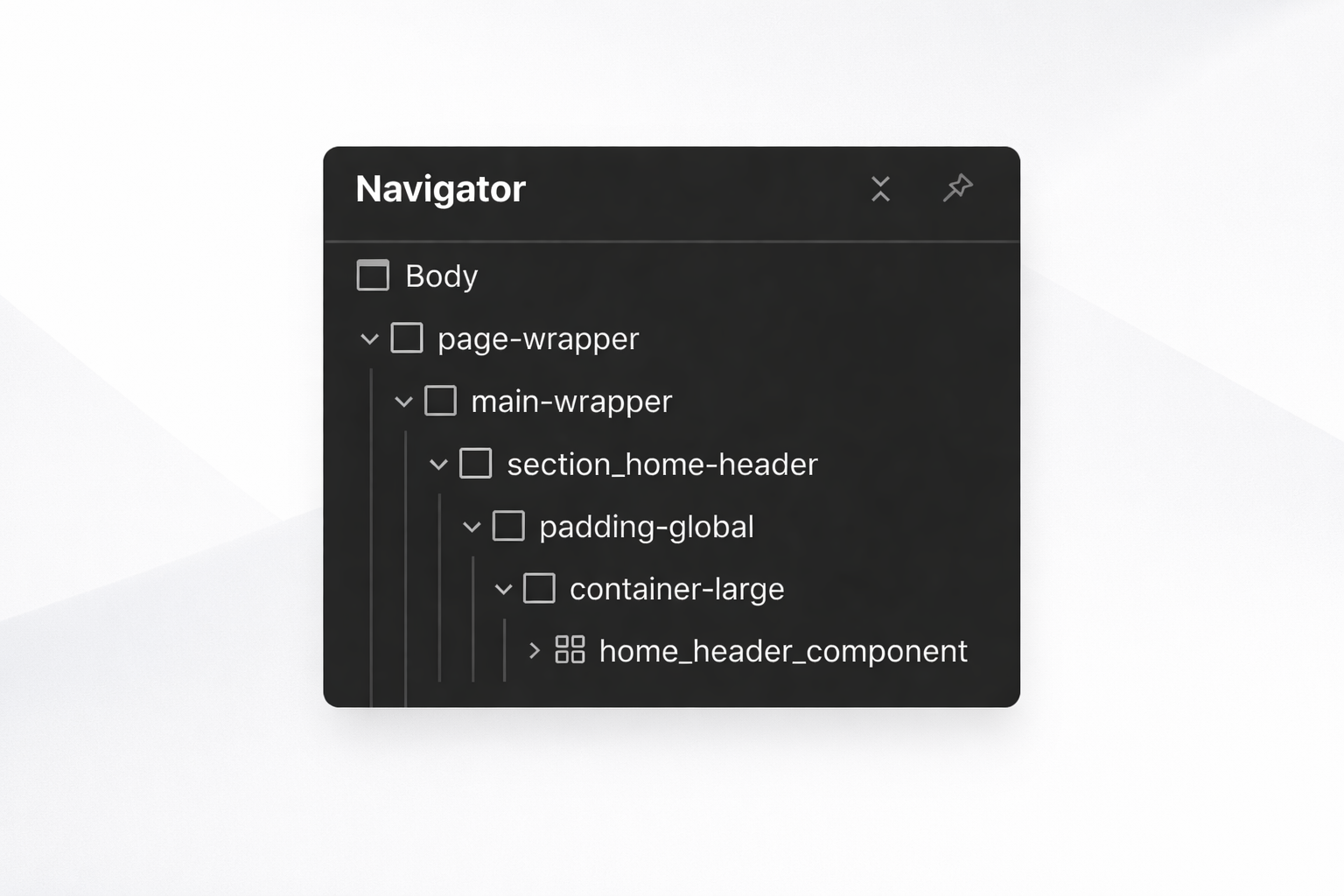
For most Webflow builds I use a structure based on Client-First so classes, sections and components remain understandable as the project grows.
The benefit becomes especially clear months after launch: another developer can orient themselves faster, new sections can reuse existing patterns and global changes are less likely to create regressions.
I cover the methodology in more detail in my Client-First Webflow guide.
Responsive development means adapting the design
Responsive design is not simply a smaller desktop layout. On mobile, content order, density, touch targets, media and sometimes the component structure itself need to change.
I test the interface across Webflow breakpoints and at intermediate widths, because many real-world layout issues appear between the exact screens shown in Figma.
CMS, interactions, SEO and performance
A Figma file rarely describes the full logic of a live website. The Webflow build also needs to define how editors add content, how CMS collections relate to each other, how forms and interactions work and which external integrations are required.
I also build the technical foundations into the implementation: logical H1/H2/H3 hierarchy, semantic elements where appropriate, clean URLs, image alt text, internal linking, optimized media and a restrained use of scripts and unnecessary wrappers.
Performance and SEO are therefore part of the translation from Figma to Webflow, not an extra layer added after the visual work is finished.
Figma to Webflow with MCP: what changed in 2026
AI-assisted workflows are moving quickly. The Figma MCP server can provide an AI agent with structured design context including frames, components, variables and layout information. The Webflow MCP server allows compatible agents to create, edit and manage Webflow pages, elements and content.
Together, these tools open a much more direct design-to-build workflow. They do not remove the need for technical direction, however: output still depends on the quality of the design context, project conventions and final QA. For production websites, I treat AI as a development accelerator rather than an automatic approval layer.
When should you hire a Figma to Webflow developer?
This is especially useful when you already have an approved design and do not need another design phase, when your designer does not build in Webflow, or when visual fidelity needs to coexist with a maintainable CMS and strong responsive behaviour.
I can take over an existing Figma file, collaborate with your designer or handle the full UX/UI and Webflow development process.
You can see examples in my Webflow portfolio or learn more about my custom Webflow development service.
Have a Figma file ready to build? Send me the design link and let’s discuss the project.
FAQ
What does Figma to Webflow development involve?
Figma to Webflow development means turning a Figma design into a functional Webflow website. It involves translating frames, components, variables, breakpoints, interactions and dynamic content into a responsive, maintainable production build rather than simply recreating the visual layout.
Can you automatically import a Figma design into Webflow?
Yes. Webflow now provides an official Figma to Webflow plugin and companion app that can sync layers, components, variables and styles. It is a useful accelerator, but a production-ready build still needs responsive QA, semantic structure, interactions, CMS setup, accessibility, SEO and performance work.
How should a Figma file be prepared before Webflow development?
A strong handoff uses consistent Auto Layout, reusable components, clear variables or styles, an understandable frame hierarchy and responsive rules. Interactions, hover and focus states, dynamic CMS content and behaviours that cannot be inferred from static screens should also be documented.
What is the difference between the Figma to Webflow plugin and custom Webflow development?
The official plugin accelerates the transfer of design structure and design-system information into Webflow. Custom development turns that imported or recreated structure into the final website with clean components, precise responsive behaviour, CMS architecture, interactions, Client-First conventions, performance, SEO, accessibility and QA. The two approaches complement each other.
Can MCP be used for Figma to Webflow workflows?
Yes. Figma and Webflow now both provide MCP servers for AI-assisted workflows. Figma MCP can supply structured design context to an AI agent, while Webflow MCP can create and edit Webflow pages, elements and content. These tools can accelerate implementation, but production work still requires clear project conventions and final human QA.